Last checked: 2026-11-04 for the e-Arrival Card and K-ETA rules (customs and KDCA details as of 2026-10-27), and the K-ETA and e-Arrival Card notice boards and the e-Arrival Card FAQ were re-read on 2026-11-20. The common-mistakes section was checked against the official guide, FAQ and submission-process pages on 2026-11-11, and the FAQ answer for transit passengers on 2026-11-13. This is an unofficial guide based on the official e-Arrival Card site, Korea Immigration Service, Korea Customs Service and KDCA pages linked here. Rules change, so confirm on those sites before you fly.
Korea’s arrival card tells immigration who you are, how you’re arriving and where you’re staying. Since February 2025 you can fill it in online before your trip as the e-Arrival Card. This guide goes through it field by field.
Not sure whether you need a K-ETA instead? Start with our K-ETA and entry rules guide, then come back here.
Quick answer: most visitors without a valid K-ETA submit the free e-Arrival Card at e-arrivalcard.go.kr, from three days before arrival (Korea time). It is valid for 72 hours after you submit it, and you need a new one for each trip. Holders of a valid K-ETA generally don’t need one; the section below lists the exceptions. If your passport is on the K-ETA exemption list and you arrive on or after January 1, 2027, no extension had been announced as of November 9, 2026, so see the before-and-after table in our K-ETA guide.
Do you need to submit one?
The official site says foreign visitors who enter Korea generally need an arrival card. That includes:
- travelers on a K-ETA exemption (for example, nationals on the temporary exemption list through December 31, 2026, or travelers exempt from K-ETA because they are 17 or under, or 65 or over),
- holders of a Korean visa,
- foreigners planning to stay 90 days or more who haven’t registered as residents yet. Korea Immigration Service points out that this group isn’t exempt.
You don’t need to submit one if you are:
- a holder of a valid K-ETA,
- a registered foreign resident (including permanent residents and people with a domestic residence report),
- a holder of a group (electronic) visa,
- aircraft crew arriving for work,
- a dual national with Korean citizenship, who must enter on the Korean passport instead.
One catch from the official guide: if you hold a K-ETA but plan to enter on a visa, you need to file the arrival card.
Is the paper card on the plane still accepted?
When the e-Arrival Card launched, Korean consulates announced that paper cards would remain available through December 2025, so travelers could choose either. We couldn’t find a newer official notice that ends paper cards. As of November 2026, the official e-Arrival Card FAQ still says that if you haven’t filed online, you can submit either the e-Arrival Card or a paper card before immigration.
So paper hasn’t been officially ruled out, but the online version is the one officials promote. File online before you fly.
When, where and how much
- Website: www.e-arrivalcard.go.kr, on a computer or a phone browser. The FAQ says there is no app, so be wary of any app claiming to be the official arrival card.
- Fee: free. Any site that charges for it is not the government service.
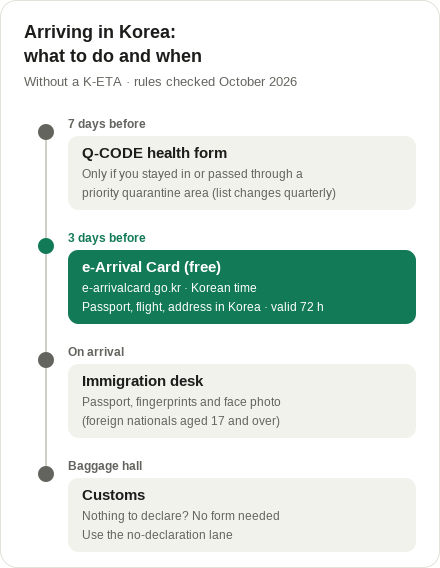
- When: from 3 days before arrival, counted in Korean time. Arriving November 20? You can submit on November 18, 19 or 20.
- Late filers: the FAQ says you can still submit after landing, as long as it’s before immigration.
- Validity: a submission lasts 72 hours and also ends once you pass immigration. Every trip needs a new card.
- Languages: Korean, English, Chinese, Japanese, Vietnamese, Thai and Russian.
Korea Immigration Service warns about fake look-alike sites. Check that the address ends in .go.kr before you type in passport details.
Before you start: what to have ready
- your passport,
- an email address you can check (the confirmation goes there),
- your arrival date and flight number,
- the address of your first place to stay in Korea, plus a phone number,
- your departure date (the departure flight number is optional).
Filling it in, step by step
1. Agree to the terms and enter your email
Choose the individual form, accept the privacy terms and type your email address twice. The person submitting needs to be at least 14.
The site’s notice of April 29, 2026 says that from May 6, 2026 submitting also involves entering a verification code to confirm the user. We couldn’t see the live form, so where the code is sent isn’t confirmed here; follow the on-screen steps.
A March 2026 notice says emails to Gmail, Outlook.com, Hotmail.com and QQ.com have sometimes arrived late or not at all, and recommends another address or saving the submission. Save the PDF as soon as you submit.
2. Passport details
Scan your passport photo page with the camera or upload a picture of it, and the form fills in your details. These are your name, date of birth, sex, nationality, passport number and expiry date. Check every character. If the scan fails, type them in by hand, exactly as printed in the passport.
3. Travel details
- Arrival: expected arrival date and your flight (or ship) number.
- Departure: expected departure date. The flight number is optional.
- Purpose of visit: pick the option from the list that best matches your trip.
- Where you’ll stay: the address of your hotel, guesthouse or host, and a contact number.
- Occupation: your job.
If you hold a Korean visa, the form can pull the stay address and contact number from your visa record.
Transit with no address in Korea? The official FAQ covers two cases:
- Leaving the airport and flying out the same day (for example, you must collect your bags and pass immigration): enter the same date for arrival and departure, and under the stay address choose the same-day transit option. The address fields are then skipped.
- Arrival and departure on different dates, but no accommodation: enter your arrival airport’s address. Incheon Terminal 1 is 272 Gonghang-ro, Yeongjong-gu, Incheon 23358; Terminal 2 is 446 Je2terminal-daero, Yeongjong-gu, Incheon 23358. The FAQ also lists Gimpo (112 Haneul-gil, Gangseo-gu, Seoul 07505), Gimhae (108 Gonghangjinip-ro, Gangseo-gu, Busan 46718) and Jeju (2 Gonghang-ro, Jeju-si 63115).
Incheon reorganized its districts on 1 July 2026, so older pages may still say Jung-gu for the airport. The official FAQ now uses Yeongjong-gu.
4. Review and submit
Check the summary, fix anything that doesn’t match your passport, and submit. You’ll get a submission number, a PDF you can save, and a confirmation email. You don’t need to print it, because officers see your submission in their system.
Common mistakes, and how to fix them
These come from the official guide, the FAQ and the submission-process page, checked on November 11, 2026.
| Mistake | What the official pages say | What to do |
|---|---|---|
| Trying to file a week ahead | Filing opens 3 days before arrival, in Korean time, and the site also shows the dates you can file | Wait for the window. Arriving December 24? File on December 22, 23 or 24 |
| Filing, then the flight slips | A card lapses 72 hours after you submit it | If you will land after the 72 hours, submit a new card |
| Your new arrival date is more than 3 days after your first submission | The arrival date can only be edited within 3 days of the first submission | Submit a new card with the new date |
| A typo in your name or passport number | The process page says to fix anything that doesn’t match your passport before you submit. The guide and FAQ give purpose of visit, stay details, departure date, occupation and the arrival date (within 3 days) as examples of what you can edit, and don’t mention passport fields | Read the review screen against your passport. If a passport field is already wrong, open Lookup and Edit first; we found no official procedure for changing it, so ask through the site’s Contact Us before you fly |
| One form for a family on different flights | Group filing is for people arriving on the same day on the same flight | File separately for anyone on another flight |
| A child as the main filer | Under-14s can’t be the representative filer | An adult or a teenager aged 14 or over files for the group |
| Ten or more people on a phone | Mobile takes up to 9 people at a time; the group form (up to 1,000) is PC only | Use a computer, or split the group |
| Using a look-alike site or an “official app” | The service is free, the site ends in .go.kr, and there is no app | Use only www.e-arrivalcard.go.kr |
| A K-ETA holder filing anyway | A valid K-ETA replaces the card, and changes go on the K-ETA site | Skip it, unless you are entering on a visa |
| Thinking it must be done before boarding | You can submit after landing, as long as it’s before immigration | File on your phone in the arrival hall, before the queue |
Which airports and ports does it cover?
The official pages we checked don’t publish a list of airports or seaports. The FAQ’s answer for transit passengers gives addresses for Incheon (Terminals 1 and 2), Gimpo, Daegu, Gimhae and Jeju airports. Korea Immigration Service’s guide lists the ship as well as the flight among the details to enter, and the FAQ says seafarers arriving in Korea also file, so the form covers arrivals by sea. Wherever you arrive, the FAQ says you can hand in either the e-Arrival Card or a paper card before immigration.
Families and groups
One person can file for everyone arriving on the same day on the same flight:
- On a phone: up to 9 people on the regular form.
- On a computer: the group form takes up to 1,000 people. You enter the shared details (flight, purpose, address) once, then add each passport. The group form works on PC only.
The site warns that false or wrong details can cause problems at entry even if someone else, such as a travel agency, filled them in.
Checking or changing your card
Use Lookup and Edit on the official site with your submission number or email. Before you reach immigration you can change your purpose of visit, accommodation details and departure date.
If your flight changes: the guide says the arrival date can only be changed within 3 days of your original submission. If your new arrival falls outside that window, or the 72 hours will run out before you land, submit a fresh card.
At immigration
Join the line for foreign passport holders and hand over your passport. Incheon Airport says foreign nationals aged 17 and over give fingerprints and a facial image at the immigration desk.
If you’re from one of the eligible countries, you can use the automated immigration gates (SES) instead of the staffed desks. According to the Ministry of Justice (press releases of March 16 and October 1, 2026), nationals of 42 countries and regions can use them, including Japan (added December 1, 2025), Taiwan, Hong Kong, Macao, Germany, Singapore, the UK, France, Australia, New Zealand, Canada, the UAE, Mexico, Switzerland, Norway, Iceland and the EU member states. Travelers aged 17 or older who enter visa-free can register on arrival at the registration centers in the immigration halls of Incheon and Jeju airports: scan your passport, then register a fingerprint and your face, and then use the gate. Filing an e-Arrival Card does not by itself give you access to the gates; they need a separate registration (official FAQ). Registered travelers can use the gates again on later visits, and the ministry’s statistics show re-entry gate use at Gimpo, Gimhae and other airports too. The Immigration Service’s English SES page is older and still lists only a few partner countries, so check the press releases for the current list (March 16, 2026, October 1, 2026). Registered Korean nationals and foreign residents use the same gates. Whether tourists can also use the gates when leaving isn’t covered in the documents we checked, so follow the signs at the airport.
Customs: only if you have something to declare
According to Korea Customs Service, if you have nothing to declare you don’t need to fill in a customs form. Walk through the no-declaration lane (bags can still be checked at random).
If you’re over the duty-free allowance, carrying more than USD 10,000 in cash or payment instruments, or bringing food, plants or animal products, declare them. You can do it on paper or on your phone. Allowances and penalties are in the customs section of our K-ETA guide.
Q-CODE: the health declaration
Q-CODE is KDCA’s online health form. It’s separate from the arrival card. Whether you need it depends on where you’ve been:
- Priority quarantine areas: if you stayed in or passed through one, a health declaration (Q-CODE or the paper health questionnaire) is required.
- Other quarantine areas: a declaration is needed only if you have symptoms such as fever or cough.
The lists change every quarter. For October to December 2026, priority areas include, among others, several Middle Eastern countries (MERS), parts of Africa (Ebola) and some US states and Chinese provinces. Japan and Hong Kong were added only to the general list, because of chikungunya. Check the current list on the KDCA or Q-CODE site before you fly. You can register from 7 days before arrival and show the QR code at quarantine. If you don’t have one, kiosks are available on arrival.
Quick checklist
- Confirm you need an arrival card (no valid K-ETA, not a registered resident)
- Submit at e-arrivalcard.go.kr within 3 days of arrival (Korean time)
- Save the submission number and confirmation email
- Re-submit if your flight moves outside the window
- Check the KDCA quarantine area list if you’ve been elsewhere first
- Plan your route from the airport: Incheon Airport to Seoul guide
- Sort out data and payments: phone data and payments guide
FAQ
Can I still fill in the paper arrival card instead?
The official FAQ, as of November 2026, still mentions paper as an option if you haven’t filed online, but the original announcement only promised paper through 2025. Don’t count on it. File online.
I have a K-ETA. Do I need an e-Arrival Card too?
No, a valid K-ETA replaces it. The official FAQ says K-ETA holders should update any changed details on the K-ETA site instead. The exception is entering on a visa rather than the K-ETA.
I forgot to submit before my flight. What now?
You can still submit on your phone after landing, as long as it’s before immigration.
My hotel changed after I submitted. Do I need a new card?
No. Use Lookup and Edit on the official site to update the stay details before you reach immigration.
Do I have to pay or print anything?
No. The e-Arrival Card is free, and officers see it in their system. Keep the submission number in case anyone asks.
This is an unofficial guide. We’re not affiliated with the Korean government and we don’t submit forms for anyone. Use only the official site, www.e-arrivalcard.go.kr, and check the latest rules before you travel.